Design System: Teaching AI Agents to Build Consistent UI
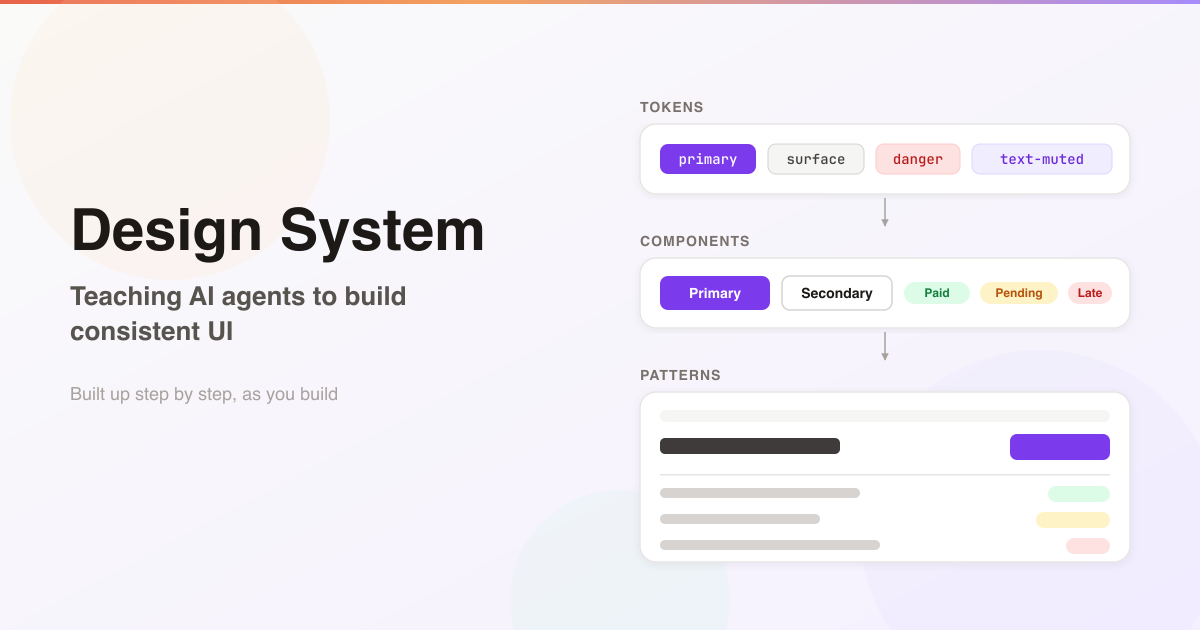
Ask an AI agent to build a new page and it’ll do a decent job. Ask it to build twenty, and you’ll have twenty slightly different apps.
One page is max-w-5xl, the next is max-w-6xl. One heading is text-2xl, another text-3xl. The primary button is bg-indigo-600 here and bg-blue-600 there. A status is a red badge on one page, red text on another, and a red badge with a dot on a third. None of it is wrong exactly. There was just no guidance, so every new view the agent designed was its own fresh guess.
That’s fine for a prototype. It’s not fine for an app you’re going to live with for years, where every new screen should look like it belongs.
The Design System You Don’t Have Time to Write
The obvious answer is a design system. Write down the tokens, the components, the page layouts, and make the agent follow them.
The problem is that a proper design system is a big upfront job. You have to decide every colour, every size, every component and every state before you’ve built the thing it’s for. Most of us don’t have weeks to spend on that, and a design system written before the app exists tends to describe an app you never build.
So I went the other way. Start with whatever the app already has, write that down, and let the system grow step by step, as you build new things. Each new page either uses what’s already specified or adds to it. Over time, the design system fills in by itself, and it always matches the real app, because it was built from the real app.
I packaged this as a Claude Code skill, rails-design-system. It’s built for Rails apps with Tailwind CSS v4, because that’s what I build with, but the ideas work for any app where an AI agent writes the UI.
What the Agent Reads
The design system lives in docs/design-system/, written for the agent to read before it touches any view:
docs/design-system/
  README.md
  conventions.md
  admin/
    design.md
    tokens.md
    components/
    patterns/
    divergences.md
  marketing/
    ...
README.mdis the router: the agent reads it first, and it points to the rest.conventions.mdholds the rules every section agrees on: text case, how each status is shown, how money and dates are formatted, how actions are worded.- Sections (
admin/,marketing/) are the parts of the app with their own audience and look. By default they share nothing, so a change to the admin buttons can never break the marketing site. - In each section,
design.mddescribes its look, with its do’s and don’ts, andtokens.mdholds its colours, type, spacing and radius. components/has one spec per component: a short contract with a canonical HTML recipe.patterns/describes whole pages (index page, form page, app shell) by naming the components they use.divergences.mdis the clean-up backlog (more on that below).
Start From What You Have
On the first run, the skill doesn’t invent a design. It reads your existing views, collects the classes they actually use, and works out the most common value for each job. If the primary buttons are bg-indigo-600 on fifteen pages and bg-blue-600 on two, the token is indigo, and the two blue buttons go in divergences.md: a backlog of everything off-system and what it should become.
It also only writes specs for components you actually use. There’s a catalog of components shipped with the skill (buttons, tables, forms, navigation, overlays) but it’s raw material, adapted to your tokens when you need one, never dumped into the app all at once. A section with no views yet gets a short interview instead of a guess.
You end up with a small design system on day one, true to the app, with a clear list of what to clean up. That’s the starting point. The rest arrives as you build.
Tokens or Nothing
The one rule everything rests on: views use role-named tokens only. Never a raw hex value, never a palette class like bg-gray-100, never an arbitrary value like w-[260px].
Tokens are named for their job, not their colour: surface, on-surface, muted, border, primary, primary-hover, danger, success. They compile into Tailwind’s @theme, so the agent writes bg-primary and text-muted instead of picking a shade.
This does two things. Re-theming the app is one edit, because primary survives a change of colour and indigo-600 doesn’t. And drift becomes mechanically detectable: any hex value, palette class or [...] value in a view is a mistake by definition. The audit that checks it is three regular expressions.
Composable Components, Closed Contracts
Tokens stop the colours drifting. Components stop everything else drifting.
Each component spec is a closed contract. It lists its axes (variant, size, tone) as fixed lists, never “anything you like”, and it covers every state: default, hover, focus-visible, active, disabled, and loading if it submits. A button might be primary, secondary or ghost, in sm, md or lg. If a new page needs a button that doesn’t fit, the answer isn’t a one-off with custom classes. It’s a new variant, added to the spec and the component, and from then on every page can use it.
And they compose, in one direction:
- Tokens feed components.
- Components compose into patterns.
- Patterns build pages.
Nothing points upwards, and no level repeats the one below it. A pattern says “uses page-heading with a primary button”, never the button’s markup. The app shell owns the page frame (width, side padding, top spacing), and every other pattern names its frame instead of repeating the classes. So “same width on every page” is true by construction, and changing it is one edit.
That’s what keeps a growing app consistent. In one of my apps, two flash banners had been built by hand, one in the settings screens and one on the sign-in card. They became one FlashBannerComponent with a fixed list of tones, the spec was updated in the same commit, and the pages that had never shown flash messages got them for free.
Growing It as You Build
Day to day, the agent follows a short block of rules in the project’s root AGENTS.md:
- Read the design system before building or changing any view.
- If a component you need has no spec, spec it first, rather than hand-rolling a one-off.
- When a change adds or alters a pattern, update the spec in the same commit.
- When I state a rule for every page (“standardise X everywhere”), record it in
conventions.mdand fix every section in the same change, not just the one in view.
That last one is how the design system standardises over time. In one app, pages that sent the reader to a next step, like “sign in to continue”, were flashing alerts, as if something had gone wrong. So conventions.md got a “Tones” section: danger for failure or loss, warning for a blocker, info for a next step or a wait, success for something done. The same commit moved the redirects in eight controllers and concerns from alerts to notices, because a next step is not an error.
It works in practice. Across eight of my apps, 543 commits changed a design-system spec together with the views or components it describes. Only 49 changed a spec on its own. The design system grows as part of building features, not as a separate chore.
Enforcement in Layers
A design system the agent ignores is just documentation. So the skill checks the work in three layers, from cheapest to most thorough.
1. A hook on every edit. After every file write, and every shell command that changes a view, a hook runs the audit on the lines just added. A raw hex value or a palette class goes straight back to the agent as a blocking error, and it has to fix it before moving on. Only new lines are checked, so old drift never blocks unrelated work. It needs no model call: it’s a regex.
2. A design reviewer. Regular expressions can’t see a button rebuilt by hand, a page at the wrong width, or a status shown two different ways. So the plugin ships a read-only review agent that checks a change against the specs, and every finding has to cite the spec line it breaks. Anything without a written rule is taste, and isn’t reported.
3. Promotion. When a mistake is likely to happen again, and a regex can catch it, it becomes a line in docs/design-system/audit-rules, with the spec it enforces in its label:
money is never typed as "AED" by hand; use aed or money (conventions.md, Formats) :: AED #\{|AED <%=
dates in views come from locale keys through l(), not to_fs (conventions.md, Formats) :: \.to_fs\(
From then on, the hook enforces it on every edit, for free. My apps have 46 of these rules between them. The reviewer finds new kinds of drift; the script stops them coming back.
A Mistake Made Twice, Stopped Once
Here’s the loop working, from one of my apps.
1 October. The header’s menu button was given lg:hidden through the button component’s class: option, to hide it on large screens. It didn’t behave as expected. The fix was to wrap the button in a <div class="lg:hidden"> instead.
2 October. A maintenance run wrote that down in two places. The button spec gained the rule: a display class never goes in class:; responsive hiding comes from a wrapper. And audit-rules gained a line, whose regex matches any ButtonComponent.new(...) call with a display class in class:. Its label names the spec it enforces:
button display comes from a wrapper, never from class: (app/components/button.md)
9 October. A new task, in the admin section this time: on phones, fold the filter bars away behind a “Filters” button. The agent wrote the button as Admin::ButtonComponent.new(variant: :secondary, size: :lg, class: "sm:hidden", ...): the exact mistake from a week before.
The admin button is a different component, but it’s built the same way and takes class: the same way. The rule, though, was written only in the app section’s button spec. The agent had even read it, the day before, in the same long session. But it was working on a different component now, and the admin spec didn’t mention the rule.
The hook blocked it. Two seconds later, the agent’s reply was:
The design hook flags the
sm:hiddenon the button. Display must come from a wrapper. I’ll wrap both buttons.
It fixed both pages and updated the page pattern’s spec to say the button sits in a div.sm:hidden wrapper. Then a reviewer pointed out that the same button-and-panel markup now appeared on two pages. So the agent made a FilterPanelComponent, wrote its spec (filter-panel.md), and rewrote the index-page pattern around it. One mistake caught, one new component in the system, both in the same commit.
That’s the part I like most. The spec alone didn’t stop the mistake: a rule written down in one place didn’t reach work in another, even for an agent that had read it. That’s the cost of keeping sections as islands: each has its own button, so a lesson learned in one isn’t automatically written down in the other. The audit rule covers the gap. It has no section limit, so its regex matched the admin button just the same, instantly and for free. And the design system came out of the task a little bigger than it went in.
Where It Runs Now
The skill runs in eight of my apps. Between them they have 273 component specs, 89 page patterns and 46 audit rules, built up from each app’s own views, not written upfront. Seven of the eight have a clean audit.
The Ideas, Without the Skill
The skill is built for Rails and Tailwind, but none of the ideas need either. If you build with something else, these are the four to copy:
- Tokens only. Name colours and sizes for their job, and treat any raw value in a view as a mistake.
- Closed component contracts. A fixed list of variants, sizes and states per component. A page that needs something new gets a new variant, not a one-off.
- Specs change with the code. Write the spec down where the agent reads it, and update it in the same commit as the view.
- A cheap check on every edit. A few regular expressions in a hook, blocking new drift the moment it’s written, plus a line for every mistake you expect to see again.
Try It
rails-design-system is a Claude Code plugin. It needs a Rails app styled with Tailwind CSS v4:
/plugin marketplace add mooktakim/skills
/plugin install rails-design-system@mooktakim
Then, inside your app, ask Claude to “set up a design system”, or run /rails-design-system:rails-design-system. It works in four phases, and nothing is written until you approve:
- Survey and plan. It finds the sections of your app and proposes every file it would write.
- Generate. Tokens and specs come from your actual views; sections with no views get an interview.
- Wire up. The root
AGENTS.mdrules,bin/audit_design, and a CI step. The hooks come with the plugin. - Review. You see everything before it’s committed, and your design intent outranks anything inferred.
Re-running it later is the maintenance: drift review, new components, and one-offs promoted into specs.
It pairs well with MVC Context, which puts the why behind your code next to the code. One gives the agent your app’s conventions; the other gives it your app’s look. The source for both is on GitHub at mooktakim/skills, MIT licensed.
You don’t need a design system before you start. You need one that grows with the app, and an agent that isn’t allowed to ignore it.