MVC Context: Putting AI Context Where Rails Already Puts the Code
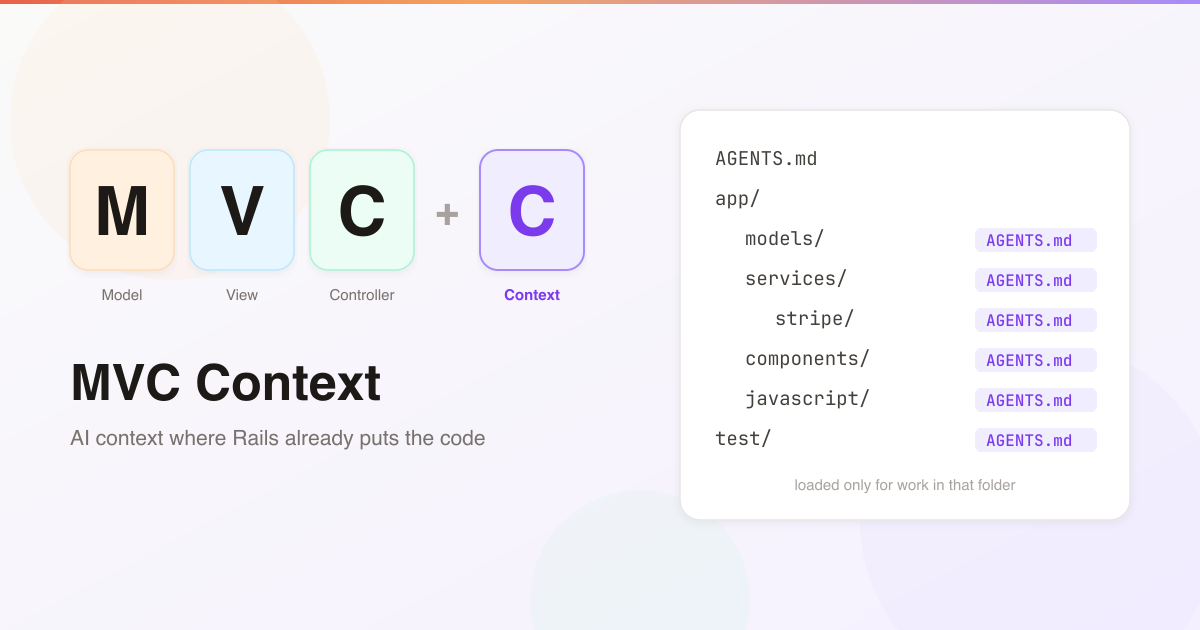
When I started using Claude Code on my Rails apps, everything went into one CLAUDE.md at the root. Naming conventions, where business logic goes, how we handle money, the patterns behind each namespace. I added as much as I could, because the more the agent knew about the app, the better its code fitted in.
Then the file got too big. And I didn’t like what that meant: the root CLAUDE.md loads into every session. A one-line CSS fix would carry the billing rules. A test tweak would carry the admin layout rules. Every task paid for every rule, in tokens and in the agent’s attention.
I wanted to add more context, not less. I just didn’t want all of it loaded all the time.
Rails Already Drew the Map
My first idea was to write new documentation in ./doc and point the agent at it.
Then it clicked. Rails already has a map. Convention over configuration means code lives in known places: models in app/models, jobs in app/jobs, components in app/components. When an agent is about to write a new service object, it is working in app/services. The folder is the topic.
So instead of a separate docs folder, put the context next to the code it describes:
AGENTS.md
app/
  models/AGENTS.md
  services/AGENTS.md
  services/stripe/AGENTS.md
  components/AGENTS.md
  javascript/AGENTS.md
test/AGENTS.md
- The root file keeps only what every task needs: setup, commands, a few hard rules.
app/models/AGENTS.mdexplains where business logic goes, what each concern is for, how money and tenancy work.app/services/AGENTS.mdsays what a service object looks like in this app.app/services/stripe/AGENTS.mdholds the provider’s quirks, and nothing else.app/components/AGENTS.mdsets out how components are built and composed.app/javascript/AGENTS.mdholds the Stimulus and Turbo rules.test/AGENTS.mdcovers the test helpers and how to stub.
Model, View, Controller… and Context.
The agent gets the services rules when it works on services, and only then. The root file shrinks back to what every task needs. And there’s suddenly room to write down far more than a single root file could ever hold.
I packaged this as a Claude Code skill, rails-context, and it now runs in ten of my Rails apps. This post is about the ideas behind it and what I learned getting it to actually work.
What a Context File Looks Like
Each context file follows the same skeleton: Purpose, Conventions, Patterns, Adding new code here, Gotchas. Sections that would only restate Rails defaults get left out. Here’s a fictional app/models/AGENTS.md for an invoicing app:
# app/models - Context

## Purpose
Domain records and the verbs that act on them. Cross-cutting utilities with
no owning model live in app/services/, not here.

## Conventions
- The model is the noun, nested classes are the verbs: `Invoice::Finalize`
  and `Invoice::SendReminder` live in `app/models/invoice/`, expose one
  public `call`, and return the record or raise.
- Money is integer cents plus a `currency` column, never floats.
- Critical constraints are enforced twice: a model validation AND a DB
  constraint.

## Adding new code here
A new model belongs to an account and includes `AccountScoped`. Anything
with a lifecycle includes `StateTimestamped`; don't hand-roll status columns.

## Gotchas
- `Account` is the multi-tenant root. An unscoped query is a bug, not a
  choice.
The content lives in AGENTS.md, the file most coding agents read. Beside it sits a one-line CLAUDE.md:
@AGENTS.md
Claude Code only reads CLAUDE.md, and that line imports the real file. Codex, Cursor and the rest read AGENTS.md directly. One source, every agent.
Intent, Not Inventory
This is the rule the whole thing rests on: context files describe the shape of a directory, never its contents.
The agent can already read the code. It can glob, grep, and open any file. Repeating what’s in the code is a waste of space at best. At worst it’s a lie waiting to happen, because the moment someone adds a file, a list in a context file is out of date, and a stale context file is worse than none.
What the code can’t tell the agent is why. Why business logic sits in nested model classes instead of app/services. Why this namespace exists. Why a pattern was chosen over the obvious alternative. That’s what goes in the file.
- Allowed: “Services are single-purpose command objects named
VerbNoun, exposing.calland returning aResult.” - Not allowed: “The main services are
ChargeCard,SendInvoiceandSyncCustomers.”
The test I use: if a sentence would need editing when someone adds one more file of the same kind, delete the sentence.
That’s what makes it work. When the agent writes a new service, it isn’t copying from a list. It knows what a service is in this app, so the new one comes out looking like the others.
One Fact, One Level
Context files form a chain. An agent working in app/services/stripe/ gets the root file, then app/services/AGENTS.md, then app/services/stripe/AGENTS.md. All three end up in its context.
So every fact lives at exactly one level: the most specific one it applies to.
- The root never explains service objects. That’s
app/services/’s job. app/services/AGENTS.mdnever explains Stripe’s webhook signing. That’sstripe/’s job.- When a deeper file appears, the parent sheds what it now covers and keeps a one-line pointer: “
stripe/- Stripe API wrapper; see its AGENTS.md.”
Deeper means more specific and shorter. And it stops the most common way context rots: the same rule written in two places, edited in one.
Not Every Folder Gets a File
Blanket coverage is the wrong goal. A directory earns a context file when at least one of these is true:
- 5+ files share a local convention (services, components, jobs).
- Its namespacing encodes domain knowledge (
app/models/billing/). - It’s code an agent would plausibly get wrong without guidance: API clients, state machines, money, multi-tenancy.
A vanilla app/helpers/ gets nothing. Fewer, denser files beat a file in every folder.
Each file aims for 30 to 100 lines. That’s a density check, not a token budget: a directory file only loads when the agent works there, so length is cheap. But every line competes for the agent’s attention, and a file that keeps growing is usually inventory creeping back in. Past 150 lines it’s flagged for review, and the fix is almost always to split a nested file out.
Keeping Context True
Context files have the same problem as all documentation: the code moves and the docs don’t. So the setup has three parts that fight drift.
1. A maintenance rule in the root file. After changing code, the agent checks the context file of each directory it touched: did this change introduce a pattern, break one, or add a namespace? If so, it updates the file surgically, in the same commit as the code. Routine changes that follow the documented patterns need nothing.
This part works. Across nine of my apps, 312 commits changed a context file together with the code it describes. Only 14 changed a context file on its own. The files get updated as part of the work, not as a chore afterwards.
2. bin/audit_context. A small Ruby script with no dependencies that flags directories whose code has changed since their context file was last touched, files past their size limit, and folders that might deserve a file. Its output is a signal to review, not proof something is stale.
3. Re-running the skill is the audit. On an app that’s already set up, the skill switches to maintenance mode: it works through what the audit flags, proposes surgical edits (never a regenerated file), and waits for my approval before writing anything.
The Surprise: Context That Never Arrived
Here’s where I got it wrong.
I assumed that when Claude Code worked in app/services, it loaded app/services/CLAUDE.md. It doesn’t, not exactly. It loads a directory’s CLAUDE.md when its Read tool opens a file in that directory.
That sounds like the same thing. It isn’t, because agents do a lot of their work through the shell. They grep across folders, cat a few files, edit with sed or a short script, and create new files with a heredoc. None of that is the Read tool, so none of it loads the directory’s context. A brand new file written into a folder the agent never read from gets no context at all. That’s exactly the moment it matters most.
So I did two things:
- Measured it. The plugin’s hooks keep a local log (in
.git/, never committed) of every time a context file reaches Claude, and how. A small report turns it into a table per file: sessions that changed code in the directory, and sessions where its context actually arrived. - Closed the gap. A
PostToolUsehook watches Bash, Write, Edit and Grep calls. When one touches code underapp/,lib/or the tests, it hands Claude the context files on that path that haven’t reached it yet in this session.
Across five apps and 63 sessions in October 2026, context files reached Claude:
- 117 times through the hook
- 67 times through Claude Code itself (a Read, or a parent loaded on the way to a nested folder)
A file can arrive more than one way in a session, so those overlap. But the shape is clear: most of the time, context reached the agent through the hook, not through the path I’d originally relied on. Even with the hook, 16 of 83 sessions that changed code in a directory still didn’t get its file, and the report shows me exactly which ones to fix.
The lesson that’s stuck with me: measure what reaches the agent, not what you wrote down. A context file the agent never sees is just documentation.
A Rule That Paid for Itself
Here’s the one that convinced me, from one of my apps with live-updating pages.
1 October. A UI review found that copy-to-clipboard buttons vanished after a form was refused. The cause was subtle. When Turbo re-renders a refused form, it morphs the page: the existing elements stay, so Stimulus controllers don’t reconnect, but their attributes go back to the server’s HTML. The clipboard controller had un-hidden its button in connect, the morph put hidden back, and connect never ran again.
About forty minutes after the fix, a rule went into the context files (it moved to the app/javascript context file that evening, during a maintenance run):
Markup a controller changed in
connectis reset by a morph: un-hide or rebuild again onturbo:morph.
7 October. A different task: move focus to a form’s error summary when a refused form comes back. A new Stimulus controller, in exactly the situation the rule describes.
The session log shows what happened. At 12:00:33 the agent listed app/javascript/controllers with ls. No Read tool, so Claude Code didn’t load the folder’s context, but the hook handed over the app/javascript context file. Five minutes later the agent wrote error_summary_controller.js with a shell heredoc. The very first version already handled the morph, with a comment explaining why: it “runs again when a second refusal morphs the page, since the summary element then stays and does not reconnect.” Then it wired up turbo:morph@document->error-summary#show. Committed at 12:07.
I can’t prove the agent wouldn’t have got there on its own. But it’s the same bug, written down after it bit me once, and the new code avoided it on the first try, in a session where the rule only arrived because of the hook. That’s the whole idea working end to end: a lesson recorded next to the code, delivered at the moment the agent needed it.
Try It
rails-context is a Claude Code plugin:
/plugin marketplace add mooktakim/skills
/plugin install rails-context@mooktakim
Then, inside your Rails app, ask Claude to “set up MVC context”, or run /rails-context:rails-context. It works in four phases, and nothing is written until you approve:
- Survey and plan. It reads the Gemfile and representative files, then proposes which directories deserve a context file, with one line each on what it would say.
- Generate. Each file is derived from your actual code. Contradictory patterns get flagged to you rather than papered over.
- Wire up maintenance. The root maintenance rule and
bin/audit_context. - Review. You see every file before it’s committed, and your intent outranks anything inferred from the code.
The source is on GitHub at mooktakim/skills, MIT licensed.
Rails gave us a place for everything. It turns out that’s also the best place to tell an agent why everything is where it is.