Building Multi-Tenant SaaS with Rails 8, Caddy, and Kamal
This is Part 2 of the Deploying Rails with Kamal series.
If you are building a SaaS where each customer gets their own subdomain — and can optionally connect a custom domain — you have probably discovered that Kamal’s built-in proxy cannot issue SSL certificates on demand. Every new domain means editing deploy.yml and redeploying. That does not scale.
This guide solves that problem. We will build a multi-tenant Rails 8 application where tenants get subdomains automatically, can connect custom domains, and SSL certificates are provisioned on the fly — no manual intervention or redeployment required. It assumes you have a Rails 8 application deployed with Kamal. If you have not set up your server yet, start with The Complete Guide to Deploying Rails 8 with Kamal on Hetzner.
The architecture described here is based on a real production application: Dinehere, an AI-powered restaurant website builder where each restaurant gets a subdomain (e.g. joes-bistro.dinehere.ai) and can optionally connect their own domain.
What Multi-Tenant SaaS Needs
The goal is straightforward:
- Subdomains for every tenant. When a tenant called “Acme” signs up, they immediately get
acme.myapp.com. - Optional custom domains. Acme can later connect
acme.comorwww.acme.comso their site is served from their own domain. - Automatic SSL. Certificates are provisioned on the fly — no manual steps, no config changes, no redeployments.
- Single server, single Rails app. All tenants are served by the same application instance, differentiated by the incoming hostname.
This is a common pattern for website builders, storefront platforms, and any SaaS where tenants have a public-facing presence. Here is how to build it.
The Limitation of kamal-proxy
If you have followed the Kamal deployment guide, you know that kamal-proxy handles TLS termination by default. You list your domains in deploy.yml:
proxy:
  ssl: true
  hosts:
    - myapp.com
    - www.myapp.com
This works perfectly for a fixed set of domains. But for a multi-tenant application, the problems become apparent quickly:
- Adding a domain requires redeployment. Every time a tenant connects a custom domain, you would need to edit
deploy.ymland redeploy. That is not scalable. - Wildcard certificates do not solve it. Let’s Encrypt wildcards require the DNS-01 challenge, which kamal-proxy cannot perform. And even if you obtained a wildcard for
*.myapp.com, it would not cover custom domains likeacme.com. - kamal-proxy was not designed for this. It is an excellent reverse proxy for single-application deployments, but dynamic multi-tenant SSL is outside its scope.
We need something that can issue certificates on demand, the moment a new domain connects for the first time.
Dynamic SSL with Caddy’s On-Demand TLS
Caddy is an open-source web server written in Go, best known for its automatic HTTPS capabilities. The feature that makes it perfect for multi-tenant SaaS is on-demand TLS.
Here is how it works:
- A request arrives for a domain Caddy has never seen before — say
acme.com. - Before issuing a certificate, Caddy makes an HTTP request to your Rails app (the
askdirective) to verify this domain is legitimate. - If your app responds with 200, Caddy obtains a Let’s Encrypt certificate and serves the request. All subsequent requests use the cached certificate.
- If your app responds with 404, Caddy rejects the connection. This prevents abuse — random domains pointed at your IP will not trigger certificate issuance.
Caddy works perfectly alongside Kamal. You run it as a Kamal accessory. kamal-proxy still handles application deployment and health checks, but you disable its SSL and bind it to localhost. Caddy sits in front, handling ports 80 and 443, terminating TLS, and proxying to kamal-proxy. You manage it with kamal accessory boot caddy and kamal accessory reboot caddy — no separate infrastructure needed.
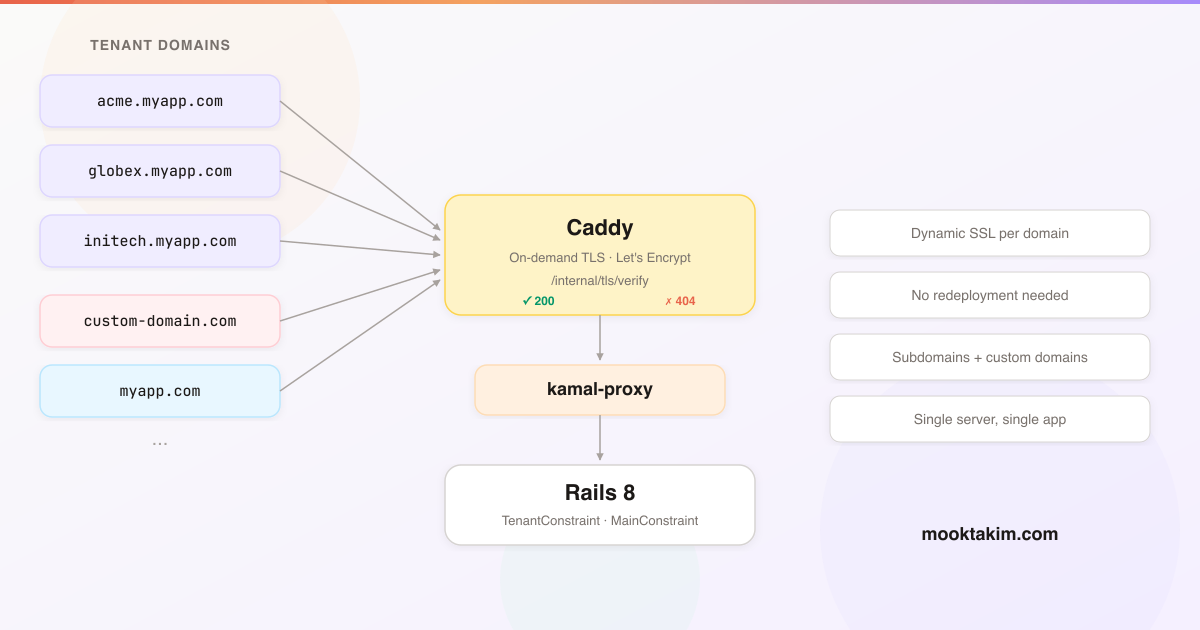
Multi-Tenant Request Flow Architecture
The system uses constraint-based routing. Every incoming request passes through Rails route constraints that determine whether the request is for a tenant or the main application.
Here is how requests flow through the system:
The constraints are evaluated in order — tenant first, then main — so tenant subdomains and custom domains are resolved before the main application routes. Before forwarding a request, Caddy checks your Rails app’s /internal/tls/verify endpoint to decide whether to issue a certificate for that domain.
Now let us build each component, starting with the data model.
The Subdomain Data Model
Start with the data model. Your Tenant model needs a subdomain column:
class AddSubdomainToTenants < ActiveRecord::Migration[8.1]
  def change
    add_column :tenants, :subdomain, :string
    add_index :tenants, :subdomain, unique: true
  end
end
DomainService
The DomainService centralises all domain logic — generating subdomains, checking availability, resolving tenants from hostnames, and building URLs.
# app/services/domain_service.rb
class DomainService
  APP_DOMAIN = Rails.application.routes.default_url_options[:host] # "myapp.com"

  RESERVED_SUBDOMAINS = %w[
    www admin api cdn assets mail ftp smtp pop imap
    staging dev test beta app dashboard billing support
    help docs status blog news shop store static media
    ns1 ns2 mx autoconfig autodiscover
  ].freeze

  SUBDOMAIN_FORMAT = /\A[a-z0-9]([a-z0-9-]*[a-z0-9])?\z/
  SUBDOMAIN_LENGTH = (3..63)

  class << self
    def generate(name)
      base = name.parameterize[0, 60]
      return base if available?(base)

      counter = 2
      loop do
        candidate = "#{base[0, 57]}-#{counter}"
        return candidate if available?(candidate)
        counter += 1
      end
    end

    def available?(subdomain)
      return false if subdomain.blank?
      return false unless subdomain.match?(SUBDOMAIN_FORMAT)
      return false unless SUBDOMAIN_LENGTH.cover?(subdomain.length)
      return false if RESERVED_SUBDOMAINS.include?(subdomain)
      return false if Tenant.exists?(subdomain: subdomain)

      true
    end

    def public_url(subdomain)
      "https://#{subdomain}.#{APP_DOMAIN}"
    end

    def find_tenant(host)
      return nil if host.blank?

      host = host.downcase.strip

      # Check if this is a known application domain
      extracted = extract_subdomain(host)
      if extracted
        return nil if RESERVED_SUBDOMAINS.include?(extracted)
        return Tenant.find_by(subdomain: extracted)
      end

      # Otherwise, check custom domains
      custom_domain = CustomDomain.find_by(domain: host)
      custom_domain&.tenant
    end

    private

    def extract_subdomain(host)
      [APP_DOMAIN, "lvh.me"].each do |base|
        if host.end_with?(".#{base}")
          sub = host.chomp(".#{base}")
          return sub unless sub.include?(".")
        end
      end

      nil
    end
  end
end
The APP_DOMAIN reads from your default URL options, which you set in config/environments/production.rb:
# config/environments/production.rb
routes.default_url_options = { host: "myapp.com", protocol: "https" }
config.assume_ssl = true
config.hosts.clear
The config.hosts.clear line is important. Rails 8 blocks requests from unknown hostnames by default. Since every tenant subdomain and custom domain is a different hostname, you need to disable host authorization entirely. Caddy already handles traffic gating through the TLS verification endpoint — if a domain is not in your database, Caddy will not issue a certificate for it, so the request never reaches Rails.
SubdomainValidator
Use a custom validator to keep the model clean:
# app/validators/subdomain_validator.rb
class SubdomainValidator < ActiveModel::EachValidator
  def validate_each(record, attribute, value)
    return if value.blank?

    unless value.match?(DomainService::SUBDOMAIN_FORMAT)
      record.errors.add(attribute, "must contain only lowercase letters, numbers, and hyphens")
    end

    unless DomainService::SUBDOMAIN_LENGTH.cover?(value.length)
      record.errors.add(attribute, "must be between 3 and 63 characters")
    end

    if DomainService::RESERVED_SUBDOMAINS.include?(value)
      record.errors.add(attribute, "is reserved")
    end
  end
end
Then in your model:
class Tenant < ApplicationRecord
  validates :subdomain, presence: true, uniqueness: true, subdomain: true
end
Constraint-Based Subdomain Routing
The heart of the multi-tenant system lives in config/routes.rb. Two constraint classes determine which routes apply to each request:
# config/routes.rb
Rails.application.routes.draw do
  # These routes must be outside all constraints.
  # Caddy calls /internal/tls/verify from 127.0.0.1, which won't
  # match any constraint. The health check also needs to be
  # accessible regardless of the host header.
  get "/up", to: "rails/health#show", as: :rails_health_check
  get "/internal/tls/verify", to: "internal/tls#verify"

  # Tenant website routes
  constraints(TenantConstraint.new) do
    scope module: :tenants do
      root "pages#show"
      # Add other tenant-specific routes here
    end
  end

  # Main application routes
  constraints(MainConstraint.new) do
    # Your main app routes — admin, auth, dashboards, etc.
    resource :session, only: %i[new create destroy]
    resources :tenants do
      resources :custom_domains, only: %i[new create destroy]
    end

    root "pages#home"
  end
end
The /internal/tls/verify route must be outside all constraints. Caddy makes this request from 127.0.0.1 using the domain it wants to verify as a query parameter — not as the host header. If this route were inside MainConstraint, the request would never match because 127.0.0.1 is not in the allowed hosts list. The same applies to the health check endpoint.
Ordering matters. Rails evaluates constraints top to bottom. The tenant constraint is checked first because subdomains and custom domains are the most common requests. The main constraint comes last as a catch-all for known application hosts.
TenantConstraint
This is where the domain resolution happens. It uses the domain_extractor gem for reliable parsing of multi-part TLDs (e.g. .co.uk, .com.au). Add it to your Gemfile:
gem "domain_extractor"
This gem handles the tricky business of parsing hostnames correctly. Without it, you would need to maintain your own list of public suffixes to know that acme.co.uk has no subdomain while acme.myapp.com has subdomain acme.
# app/constraints/tenant_constraint.rb
class TenantConstraint
  KNOWN_HOSTS = %w[myapp.com lvh.me].freeze

  def matches?(request)
    host = request.host.downcase

    if known_host?(host)
      # Extract subdomain from known application domains
      subdomain = extract_subdomain(host)
      return false if subdomain.blank?
      return false if DomainService::RESERVED_SUBDOMAINS.include?(subdomain)

      Tenant.exists?(subdomain: subdomain)
    else
      # Unknown host — check custom domains
      CustomDomain.exists?(domain: host)
    end
  end

  private

  def known_host?(host)
    KNOWN_HOSTS.any? { |h| host == h || host.end_with?(".#{h}") }
  end

  def extract_subdomain(host)
    parsed = DomainExtractor.parse(host)
    sub = parsed&.subdomain
    sub.presence
  rescue StandardError
    nil
  end
end
MainConstraint
A whitelist of known application hosts:
# app/constraints/main_constraint.rb
class MainConstraint
  MAIN_HOSTS = %w[
    myapp.com
    www.myapp.com
    localhost
    lvh.me
    127.0.0.1
  ].freeze

  def matches?(request)
    MAIN_HOSTS.include?(request.host.downcase)
  end
end
Resolving the Current Tenant
With routing in place, tenant controllers need to resolve the current tenant from the request hostname. The BaseController uses DomainService.find_tenant and exposes current_tenant to all views via helper_method:
# app/controllers/tenants/base_controller.rb
module Tenants
  class BaseController < ApplicationController
    layout "tenant"

    private

    def current_tenant
      @current_tenant ||= DomainService.find_tenant(request.host)
    end
    helper_method :current_tenant
  end
end
The PagesController handles the main tenant page:
# app/controllers/tenants/pages_controller.rb
module Tenants
  class PagesController < Tenants::BaseController
    def show
      return head(:not_found) unless current_tenant

      render :show
    end
  end
end
Custom Domains
The Model
# app/models/custom_domain.rb
class CustomDomain < ApplicationRecord
  belongs_to :tenant, touch: true

  validates :domain, presence: true,
                     uniqueness: { case_sensitive: false },
                     custom_domain_format: true

  normalizes :domain, with: ->(d) { d.strip.downcase }
end
Migration:
class CreateCustomDomains < ActiveRecord::Migration[8.1]
  def change
    create_table :custom_domains do |t|
      t.references :tenant, null: false, foreign_key: true
      t.string :domain, null: false

      t.timestamps
    end

    add_index :custom_domains, :domain, unique: true
  end
end
CustomDomainFormatValidator
This validator blocks obviously invalid input — domains with protocols, ports, paths, or domains belonging to your own application:
# app/validators/custom_domain_format_validator.rb
class CustomDomainFormatValidator < ActiveModel::EachValidator
  OWN_DOMAINS = %w[myapp.com].freeze

  def validate_each(record, attribute, value)
    return if value.blank?

    domain = value.to_s.strip.downcase

    if domain.include?("://")
      record.errors.add(attribute, "should not include a protocol (remove http:// or https://)")
      return
    end

    if domain.include?("/")
      record.errors.add(attribute, "should not include a path")
      return
    end

    if domain.match?(/:\d+/)
      record.errors.add(attribute, "should not include a port number")
      return
    end

    if OWN_DOMAINS.any? { |d| domain == d || domain.end_with?(".#{d}") }
      record.errors.add(attribute, "cannot be a #{DomainService::APP_DOMAIN} domain")
      return
    end

    unless domain.match?(/\A[a-z0-9]([a-z0-9.-]*[a-z0-9])?\.[a-z]{2,}\z/)
      record.errors.add(attribute, "is not a valid domain name")
    end
  end
end
DNS Instructions for Users
When a tenant adds a custom domain, you need to tell them how to configure their DNS. The instructions depend on whether they are connecting a subdomain or a root domain:
For subdomains (e.g. www.acme.com): Create a CNAME record pointing to their tenant subdomain.
Type:  CNAME
Name:  www
Value: acme.myapp.com
For root domains (e.g. acme.com): Root domains cannot use CNAME records (per the DNS specification). The tenant needs an ALIAS, ANAME, or CNAME-flattening record pointing to your server. Support for this varies by DNS provider:
- Cloudflare: CNAME flattening — just add a CNAME at the root and Cloudflare handles it
- Route 53: ALIAS record
- DNSimple: ALIAS record
- Others: Some providers do not support this. The fallback is an A record pointing to
203.0.113.10
Display these instructions clearly in your UI after a domain is added. You might also want to add a DNS verification check that runs periodically to confirm the domain is pointed correctly before showing it as active.
Replacing kamal-proxy with Caddy
This is where the pieces come together. We configure Caddy as a Kamal accessory, disable SSL on kamal-proxy, and let Caddy handle all TLS termination.
The Caddyfile
Create config/Caddyfile in your Rails project:
{
  email deploy@myapp.com
  on_demand_tls {
    ask http://127.0.0.1:3000/internal/tls/verify
  }
}

# Direct IP access — redirect to main domain
http://203.0.113.10 {
  redir https://myapp.com permanent
}

# HTTP catch-all — redirect to HTTPS
:80 {
  redir https://{host}{uri} permanent
}

# HTTPS — the main handler
:443 {
  tls {
    on_demand
  }

  request_body {
    max_size 15MB
  }

  reverse_proxy 127.0.0.1:3000 {
    header_up Host {host}
    header_up X-Real-IP {remote_host}
    flush_interval -1
    transport http {
      read_timeout 120s
      write_timeout 120s
      compression off
    }
  }
}
Let us walk through each block:
on_demand_tls { ask ... }: The global directive telling Caddy where to verify domains before issuing certificates. It calls your Rails endpoint on127.0.0.1:3000— the loopback address, so this never leaves the server.http://203.0.113.10: Anyone hitting the server by IP gets redirected to your main domain. Without this, the bare IP would show an error.:80: All HTTP traffic redirects to HTTPS. Simple and universal.:443: The main HTTPS handler.tls { on_demand }enables on-demand certificate issuance. Thereverse_proxyblock forwards requests to kamal-proxy on port 3000, preserving the originalHostheader and client IP. Theflush_interval -1ensures streaming responses (like Turbo Streams) are forwarded immediately. Compression is disabled because Thruster (which sits between kamal-proxy and Puma) already handles gzip/brotli compression.
deploy.yml Changes
proxy:
  ssl: false
  run:
    http_port: 3000
    https_port: 3001
    bind_ips:
      - 127.0.0.1

accessories:
  caddy:
    image: caddy:2
    host: 203.0.113.10
    network: host
    options:
      cap-add: NET_ADMIN
    files:
      - config/Caddyfile:/etc/caddy/Caddyfile:ro
    volumes:
      - caddy_data:/data
      - caddy_config:/config
Key changes:
ssl: false: kamal-proxy no longer handles TLS. It listens on plain HTTP.http_port: 3000: kamal-proxy listens on port 3000 instead of 80.bind_ips: [127.0.0.1]: kamal-proxy only accepts connections from localhost. It is not directly accessible from the internet — all external traffic goes through Caddy.network: host: Caddy uses the host network stack so it can bind to ports 80 and 443 directly.cap-add: NET_ADMIN: Required for Caddy to bind to privileged ports.volumes: Thecaddy_datavolume stores certificates. This must persist across accessory reboots — without it, Caddy would re-issue certificates every time, potentially hitting Let’s Encrypt rate limits.
Boot the accessory:
kamal accessory boot caddy
To update the Caddyfile after changes:
kamal accessory reboot caddy
The TLS Verification Endpoint
This is the endpoint Caddy calls before issuing a certificate. It reuses the same constraint classes your routes use, ensuring perfect consistency — if a domain can reach your app through routing, Caddy will issue a certificate for it.
# app/controllers/internal/tls_controller.rb
module Internal
  class TlsController < ApplicationController
    skip_before_action :authenticate_user!

    def verify
      domain = params[:domain].to_s.downcase.strip

      if allowed_domain?(domain)
        expires_in 1.day, public: true
        head :ok
      else
        head :not_found
      end
    end

    private

    def allowed_domain?(domain)
      request = Struct.new(:host).new(domain)

      MainConstraint.new.matches?(request) ||
        TenantConstraint.new.matches?(request)
    end
  end
end
As noted in the routing section, this route must be outside all constraints — Caddy calls it from 127.0.0.1, not from a matching host.
The expires_in 1.day header tells Caddy to cache the response. Without it, Caddy would call the endpoint on every request for every domain, adding unnecessary load.
Since this endpoint is called by Caddy from localhost, make sure to whitelist the /internal/ path in whatever rate limiting you use. If you use Rack::Attack:
# config/initializers/rack_attack.rb
Rack::Attack.safelist("internal") do |req|
  req.path.start_with?("/internal/")
end
Cloudflare Integration
If you use Cloudflare (and you should — it provides CDN caching, DDoS protection, and CNAME flattening for free), there are a few things to configure.
Trusted Proxies
When Cloudflare proxies your traffic, request.remote_ip will show Cloudflare’s IP instead of the visitor’s real IP. Add Cloudflare’s IP ranges to your trusted proxies:
# config/initializers/cloudflare.rb
CLOUDFLARE_IPS = %w[
  173.245.48.0/20
  103.21.244.0/22
  103.22.200.0/22
  103.31.4.0/22
  141.101.64.0/18
  108.162.192.0/18
  190.93.240.0/20
  188.114.96.0/20
  197.234.240.0/22
  198.41.128.0/17
  162.158.0.0/15
  104.16.0.0/13
  104.24.0.0/14
  172.64.0.0/13
  131.0.72.0/22
].map { |ip| IPAddr.new(ip) }

Rails.application.config.action_dispatch.trusted_proxies =
  ActionDispatch::RemoteIp::TRUSTED_PROXIES + CLOUDFLARE_IPS
DNS Configuration
Set up two DNS records in Cloudflare:
myapp.com— A record pointing to203.0.113.10, proxied (orange cloud)*.myapp.com— A record pointing to203.0.113.10, proxied (orange cloud)
Both records can be proxied through Cloudflare. The wildcard record means every subdomain automatically gets Cloudflare’s CDN, DDoS protection, and caching.
Set the SSL/TLS encryption mode to Full in the Cloudflare dashboard. Do not use Flexible — it causes redirect loops because Caddy redirects HTTP to HTTPS while Cloudflare sends HTTP.
Caddy’s on-demand TLS works behind Cloudflare because Cloudflare forwards the TLS handshake with SNI (Server Name Indication) intact. For subdomains under *.myapp.com, Cloudflare handles TLS on its edge and Caddy handles TLS between Cloudflare and your origin. For custom domains (which do not go through Cloudflare), Caddy handles TLS directly with the client.
Local Development with lvh.me
Testing multi-tenant routing locally is straightforward thanks to lvh.me. This domain resolves to 127.0.0.1 — and so do all its subdomains. No hosts file editing required.
With your Rails server running on port 3000:
http://lvh.me:3000— Hits the main application (MainConstraint matches)http://acme.lvh.me:3000— Hits the tenant site for “acme” (TenantConstraint matches)
Make sure lvh.me appears in all your constraint host lists alongside the production domain. You saw this in the constraint classes above — KNOWN_HOSTS includes both myapp.com and lvh.me, and MAIN_HOSTS includes lvh.me and localhost.
This gives you a local development experience that closely mirrors production. You can test subdomain routing, custom domain resolution (by adding entries to /etc/hosts if needed), and the full constraint chain without deploying anything.
The Complete Multi-Tenant File Structure
Here is a summary of all the files involved:
Models and migrations:
app/models/tenant.rb— withsubdomaincolumn and validationapp/models/custom_domain.rb— belongs to tenant, stores custom domains- Migrations for both tables
Services:
app/services/domain_service.rb— subdomain generation, availability checks, tenant resolution
Validators:
app/validators/subdomain_validator.rb— format, length, reserved wordsapp/validators/custom_domain_format_validator.rb— blocks invalid domain input
Constraints:
app/constraints/tenant_constraint.rb— matches tenant subdomains and custom domainsapp/constraints/main_constraint.rb— matches main application hosts
Controllers:
app/controllers/tenants/base_controller.rb— tenant resolutionapp/controllers/tenants/pages_controller.rb— serves tenant contentapp/controllers/internal/tls_controller.rb— Caddy verification endpoint
Configuration:
config/routes.rb— three constraint blocksconfig/Caddyfile— on-demand TLS configurationconfig/deploy.yml— Kamal with Caddy accessoryconfig/initializers/rack_attack.rb— safelist internal endpointsconfig/initializers/cloudflare.rb— trusted proxies
Dinehere uses this exact architecture in production — every restaurant gets a subdomain on signup, and connecting a custom domain is a self-service operation that takes effect within seconds. No redeployment, no manual certificate management, no downtime.
Production Considerations
A few things to keep in mind once this is running in production:
Let’s Encrypt rate limits. You can issue a maximum of 50 certificates per registered domain per week. This applies to myapp.com (covering all *.myapp.com subdomains) as a single registered domain. Custom domains each count against their own registered domain, so those are effectively unlimited. In practice, Caddy caches certificates and renews them automatically — you will only hit the limit if you are provisioning more than 50 new subdomains per week.
Certificate storage. The caddy_data Docker volume stores all issued certificates. This volume must persist across accessory reboots. If it is lost, Caddy will need to re-issue every certificate, which could hit rate limits. Back up this volume regularly.
Monitoring. Check Caddy’s logs with:
kamal accessory logs caddy
kamal accessory logs caddy --follow
Look for certificate issuance errors, failed ask requests, and TLS handshake failures.
Removing custom domains. When a tenant removes a custom domain, the certificate remains in Caddy’s cache until it expires. This is harmless — Caddy will simply not renew it. The domain will stop resolving to your server once the DNS record is removed.
Optional: CDN Subdomain for Assets
There is a subtle problem with custom domains: they do not go through Cloudflare. When a visitor loads acme.com, Caddy handles TLS directly and proxies to Rails. The page HTML is served fine, but all assets (images, stylesheets, scripts) are also served directly without CDN caching or edge delivery.
For tenants with significant traffic on custom domains, this can be a performance issue. The solution is to serve assets from a dedicated CDN subdomain — cdn.myapp.com — which always goes through Cloudflare regardless of which domain the tenant uses.
Add a CdnConstraint to match your CDN subdomain, and add it as the first constraint block in your routes. It proxies ActiveStorage blob requests and redirects everything else:
# app/constraints/cdn_constraint.rb
class CdnConstraint
  CDN_HOSTS = %w[cdn.myapp.com cdn.lvh.me].freeze

  def matches?(request)
    CDN_HOSTS.include?(request.host.downcase)
  end
end
In your routes:
constraints(CdnConstraint.new) do
  # Redirect root and all non-ActiveStorage paths to the main domain.
  # ActiveStorage proxy routes are auto-mounted by Rails and will still
  # match on this subdomain — the negative lookahead ensures we don't
  # redirect those requests.
  get "/", to: redirect("https://myapp.com", status: 301)
  get "/*path", constraints: { path: /(?!rails\/active_storage).+/ },
      to: redirect("https://myapp.com", status: 301)
end
Add a cdn_host method to your DomainService and use it when generating asset URLs in tenant views:
# Add to DomainService
def self.cdn_host
  "cdn.#{APP_DOMAIN}"
end
<%= image_tag rails_storage_proxy_url(image, host: DomainService.cdn_host) %>
This way, even when a visitor is on acme.com, all images and assets load from cdn.myapp.com through Cloudflare’s edge network. The tenant’s page loads over their custom domain (for branding), but assets benefit from CDN caching and global distribution.
This optimisation is only worth implementing if you have tenants using custom domains with meaningful asset traffic. For subdomain-only setups where everything goes through Cloudflare anyway, it is unnecessary.
Optional: Primary Domain Redirect
If tenants can connect multiple custom domains — say acme.com and www.acme.com — the same content becomes accessible at multiple URLs. Search engines treat these as duplicate pages, diluting page authority and potentially causing indexing issues. A 301 redirect to a primary domain consolidates link equity and establishes a single canonical URL.
Add a primary column to custom_domains:
class AddPrimaryToCustomDomains < ActiveRecord::Migration[8.1]
  def change
    add_column :custom_domains, :primary, :boolean, default: false, null: false
  end
end
When a tenant sets a primary domain, ensure only one is marked as primary:
# app/models/custom_domain.rb
class CustomDomain < ApplicationRecord
  belongs_to :tenant, touch: true

  validates :domain, presence: true,
                     uniqueness: { case_sensitive: false },
                     custom_domain_format: true

  normalizes :domain, with: ->(d) { d.strip.downcase }

  scope :primary, -> { where(primary: true) }

  before_save :ensure_single_primary

  private

  def ensure_single_primary
    if primary? && primary_changed?
      tenant.custom_domains.where.not(id: id).update_all(primary: false)
    end
  end
end
Then redirect non-primary domains in your tenant controller:
# app/controllers/tenants/pages_controller.rb
module Tenants
  class PagesController < Tenants::BaseController
    def show
      return head(:not_found) unless current_tenant

      if redirect_to_primary_domain?
        return redirect_to primary_domain_url, status: :moved_permanently, allow_other_host: true
      end

      render :show
    end

    private

    def redirect_to_primary_domain?
      primary = current_tenant.custom_domains.primary.first
      primary && request.host != primary.domain
    end

    def primary_domain_url
      "https://#{current_tenant.custom_domains.primary.first.domain}#{request.fullpath}"
    end
  end
end
When a visitor arrives on www.acme.com but the tenant has marked acme.com as primary, they get a 301 redirect. Search engines follow the redirect and index only the primary domain.
That covers the full stack — from data model to deployment. The key insight is that Caddy’s on-demand TLS turns what would be a complex certificate management problem into a single HTTP endpoint. Your Rails app already knows which domains are valid through its routing constraints, so the TLS verification endpoint is just a thin wrapper around the same logic. Kamal handles deployments, Caddy handles certificates, and Rails handles everything else.
If you have not set up your server yet, start with The Complete Guide to Deploying Rails 8 with Kamal on Hetzner — it covers everything from provisioning to production.